
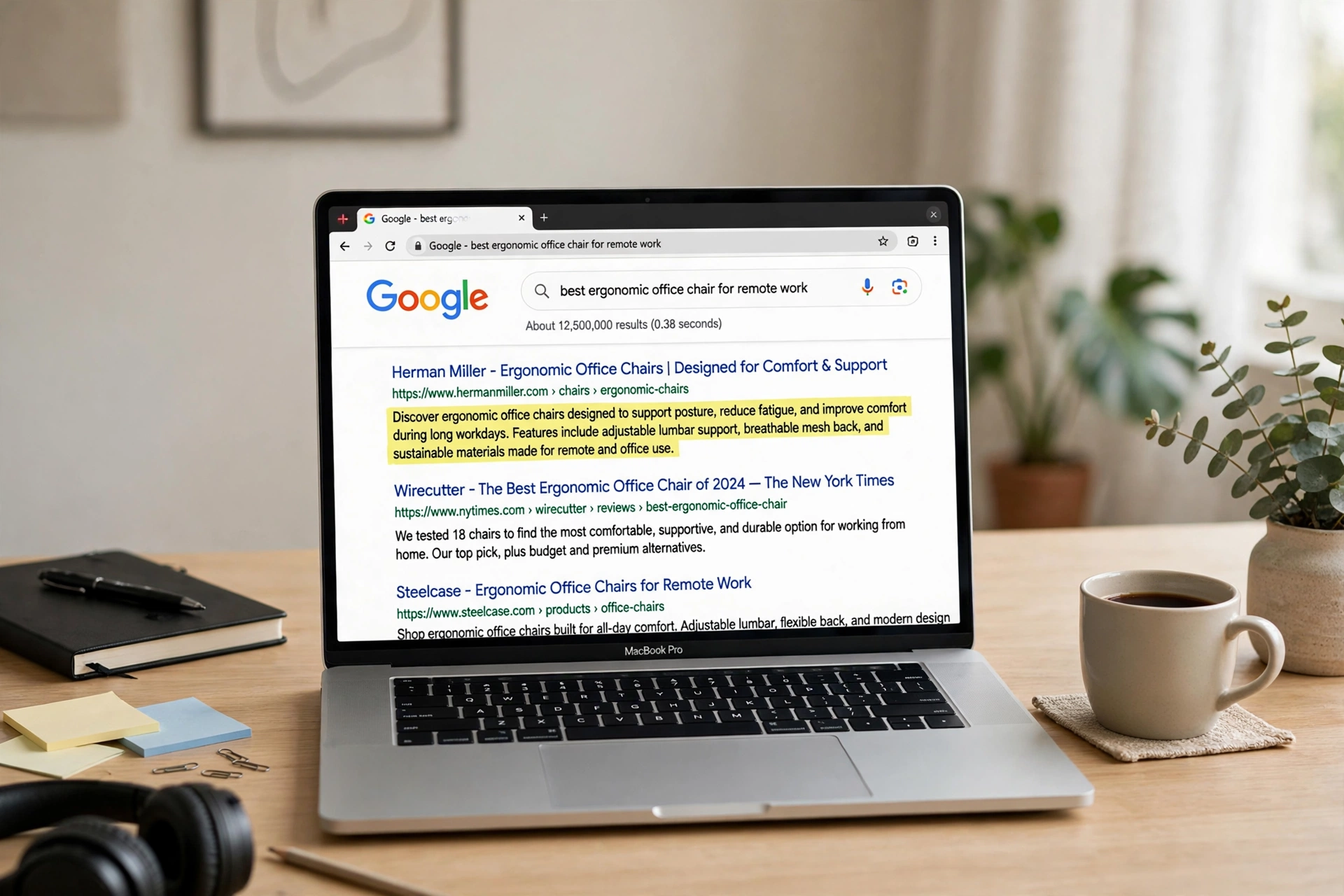
Your page can rank on the first page of Google and still get very few visitors. The reason is often simple: the meta description does not convince anyone to click. Learning how to write meta descriptions that get clicks is one of the fastest ways to increase traffic without writing new content or building new links. A good description acts like a small advert for your page, and it costs nothing to improve.
In this guide, you will learn what a meta description is, why it matters, how long it should be, and a simple step-by-step process for writing descriptions that earn more clicks from Google search results.
What Is a Meta Description?
A meta description is a short summary of a web page, usually between 120 and 160 characters long. It does not appear on the page itself. Instead, it appears underneath the page title in Google search results, where it tells searchers what the page is about and why it is worth opening.
Search engines do not always show the meta description you write. Sometimes Google writes its own description from your page content, especially when it thinks another snippet matches the search better. Even so, a well-written description is used most of the time, and it is your best chance to control the first impression of your page in the search results.
Why Meta Descriptions Matter for Clicks
Meta descriptions are not a direct ranking factor. Google has said clearly that they do not affect where your page ranks. However, they strongly affect the click-through rate — the percentage of people who see your page in search results and choose to click it.
A higher click-through rate brings more visitors from the same rankings, which is valuable for any business. It also sends a positive signal to Google that your result satisfies searchers. For a small business, improving descriptions across ten or twenty pages can bring a noticeable increase in enquiries and sales, without spending anything on advertising.
Think of the search results page as a shop window. Your title is the shop sign, and your meta description is the display in the window. If the display is empty or boring, people walk past, even if your shop is excellent.
How Long Should a Meta Description Be?
Google usually shows about 155 to 160 characters of a meta description on desktop, and slightly less on mobile. If your description is longer, Google cuts it off with an ellipsis, which looks untidy and wastes your message.
Aim for 120 to 160 characters. That is long enough to explain the benefit of the page and include a call to action, but short enough to display in full on most devices. Always check the character count before you publish — a description that is cut off mid-sentence rarely earns a click.
If you want a quick way to check length and preview how your result will look, try our free Meta Tag Generator. It counts characters, shows a live Google preview, and lets you copy the finished HTML tags.
How to Write Meta Descriptions That Get Clicks
Follow these seven steps every time you write a new page or update an old one.
1. Match the search intent
Before you write a word, ask what the searcher wants. Someone searching for “best budget laptop” wants comparisons and prices, while someone searching for “how to reset a router” wants clear instructions. Your description should promise exactly what that person is looking for. If the page does not match the intent, no description can save it.
2. Include your main keyword naturally
Use the main keyword or phrase for the page early in the description, in natural language. Google bolds the words that match the search, which makes your result stand out and reassures the searcher that your page is relevant. Do not stuff the keyword in twice or force it into an unnatural sentence.
3. Lead with the benefit, not the feature
People click because of what they will gain. “Learn how to cut your energy bill by 20% in one weekend” is far stronger than “This article is about energy saving.” Start with the outcome, the answer, or the solution the reader will find on your page.
4. Add a clear call to action
Tell the searcher what to do next: “Learn how”, “Discover”, “Get your free quote”, “See the full guide”, or “Shop the collection”. A gentle call to action turns a passive summary into an invitation, and invitations get more clicks.
5. Be specific and honest
Numbers, dates and specifics build trust. “Save up to 40% on car insurance” is more convincing than “Save money on car insurance”. But never promise something the page does not deliver — visitors who feel misled leave immediately, and that hurts your business far more than a lost click.
6. Write for people, not robots
Write in plain, active language, as if you were describing the page to a friend. Short sentences work well. Avoid jargon, capital letters for every word, and strings of keywords separated by commas, which read like spam and put people off.
7. Make every description unique
Never copy the same description across several pages. Duplicate descriptions confuse Google and give searchers no reason to choose one page over another. Each page deserves its own summary that reflects its own content.
Meta Description Examples
Here are two examples that show the difference a good description makes.
Weak: “We sell shoes. Our website has many shoes for men, women and children. Visit our website today to see our shoes.” This says nothing useful and gives no reason to click.
Strong: “Shop comfortable leather shoes with free delivery over £50. Browse 200+ styles for men and women — find your perfect pair today.” This gives benefits, specifics and a call to action in under 160 characters.
The strong version works because it answers the searcher’s questions before they even open the page: what will I get, how much does delivery cost, and is it worth my time?
Common Mistakes to Avoid
- Leaving it blank. If you write nothing, Google picks text from your page at random, and the result is rarely flattering.
- Writing too much. Long descriptions are cut off, so your call to action may never be seen.
- Keyword stuffing. Repeating the same phrase looks unnatural and reduces trust.
- Using the same description everywhere. Duplicate descriptions waste the chance to sell each page on its own merits.
- Writing clickbait. Exaggerated claims bring clicks but also instant exits, which damages your reputation.
Frequently Asked Questions
Do meta descriptions affect Google rankings?
No, meta descriptions are not a direct ranking factor. They do, however, affect click-through rate, which brings more traffic from the rankings you already have.
What is the ideal meta description length?
Aim for 120 to 160 characters. This keeps your full message visible on both desktop and mobile search results.
Can I use the same meta description on every page?
You should not. Each page needs a unique description that reflects its own content, or Google may ignore your descriptions altogether.
Does Google always show my meta description?
No. Google sometimes writes its own description from your page content if it thinks that matches the search better. A clear, relevant description is still shown most of the time.
Should the focus keyword be in the meta description?
Yes, include it naturally near the start. Google bolds matching words in the search results, which helps your result stand out.
Conclusion
Knowing how to write meta descriptions that get clicks is a simple skill with a real payoff. Match the search intent, lead with the benefit, include your keyword naturally, add a call to action, and keep it under 160 characters. Then do the same for every important page on your website. Small improvements across many pages add up to a large increase in traffic — and you do not need a bigger budget to achieve it. Start with your most visited pages today, and use our free Meta Tag Generator to write and preview your new descriptions in minutes.